

Need an answer quickly? When you have a tight connection or a last-minute plan, a Priority Request moves you to the front of the line.
Priority Requests appear at the top of the open request lists, in their own section, so members from your airline see them first. They also earn the responder double credits, which gives them a good reason to answer yours before the others.
How to post a Priority Request
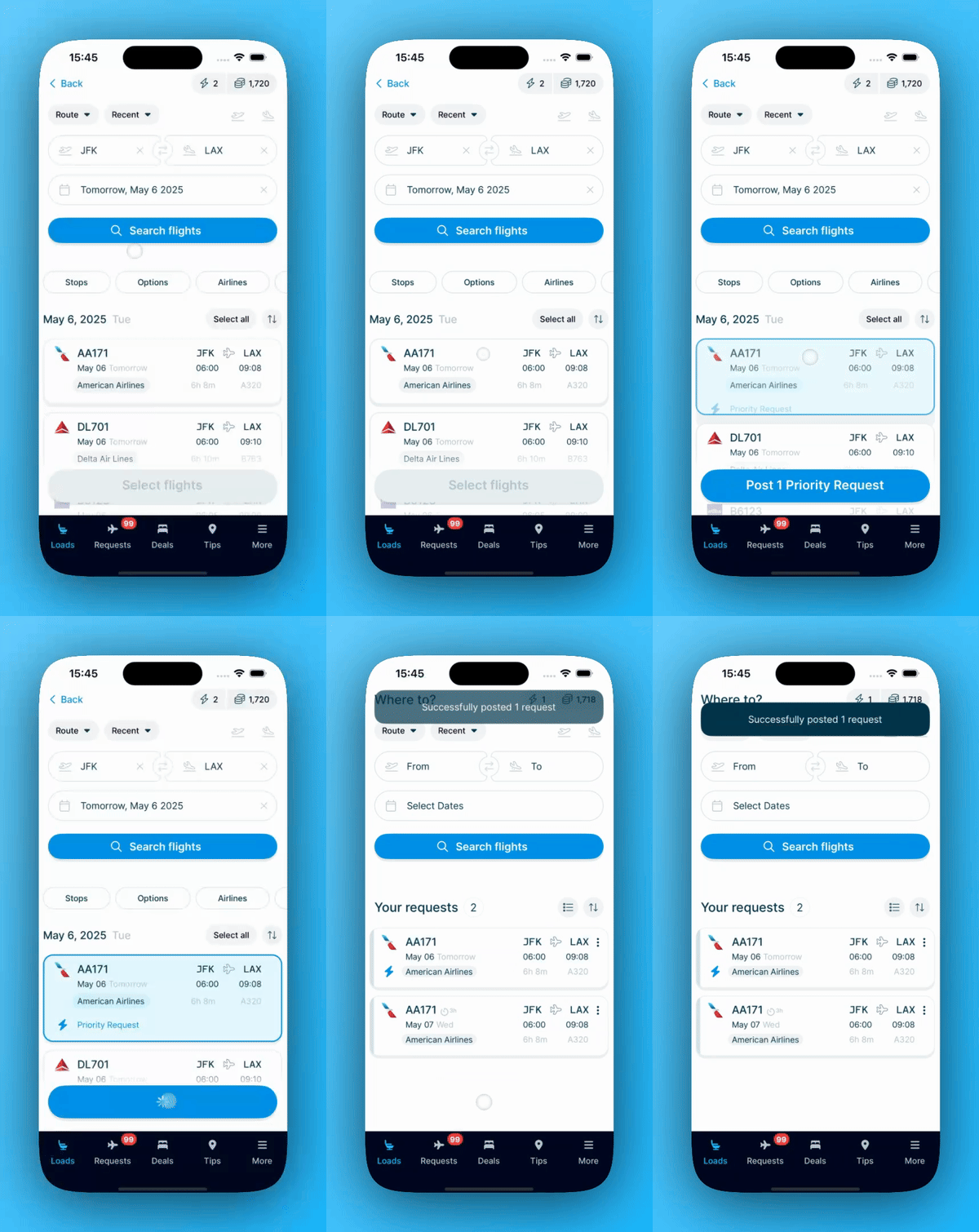
Tap a flight twice in the search results. One tap selects the flight, and a second tap turns it into a Priority Request. A lightning bolt appears on the flight, along with the words 'Priority Request'. Tap once more to deselect it.
You can mix and match. Select a few flights normally, mark just one as a Priority Request, and post them all together.
What does a Priority Request cost?
Priority Requests use their own currency, called Priority Credits. Your regular credits stay untouched.
Posting a Priority Request costs 1 Priority Credit
Upgrading a request you already posted costs 1 Priority Credit
The member who answers your Priority Request earns 2 credits
If your Priority Request stays unanswered before departure, we will refund your Priority Credit
Your Priority Credit balance sits next to your regular credit balance at the top of the 'Loads' tab. Look for the lightning bolt.
How to get Priority Credits?
You have two options, and the first one is free.
Earn them with Points: every time you respond to a request, invite a friend, share a tip, book a hotel, or buy an eSIM data plan, you collect Points. At 100 Points, you automatically unlock 1 Priority Credit.
Buy them in the app: open the 'Buy credits' screen and switch to the 'Priority Credits' tab, where they come in packs of 5 and 10. Priority Credits can only be bought in the mobile app, not on the website.
How to upgrade a request you already posted
Changed your mind after posting? You can promote any request that is still open and unanswered.
Open the 'Loads' tab and find the request you want to move up. It needs to still be open and unanswered.
Tap the menu icon (three vertical dots ⋮ ) on the right of the flight.
Choose 'Upgrade to Priority Request', then tap 'Confirm Upgrade'.
Good to know
Open requests are typically sorted by departure date and time. Priority Requests appear in a dedicated section above the list, helping them stand out. Members earn double credits and double Points for answering them, encouraging faster responses.