

Accessing live flight status
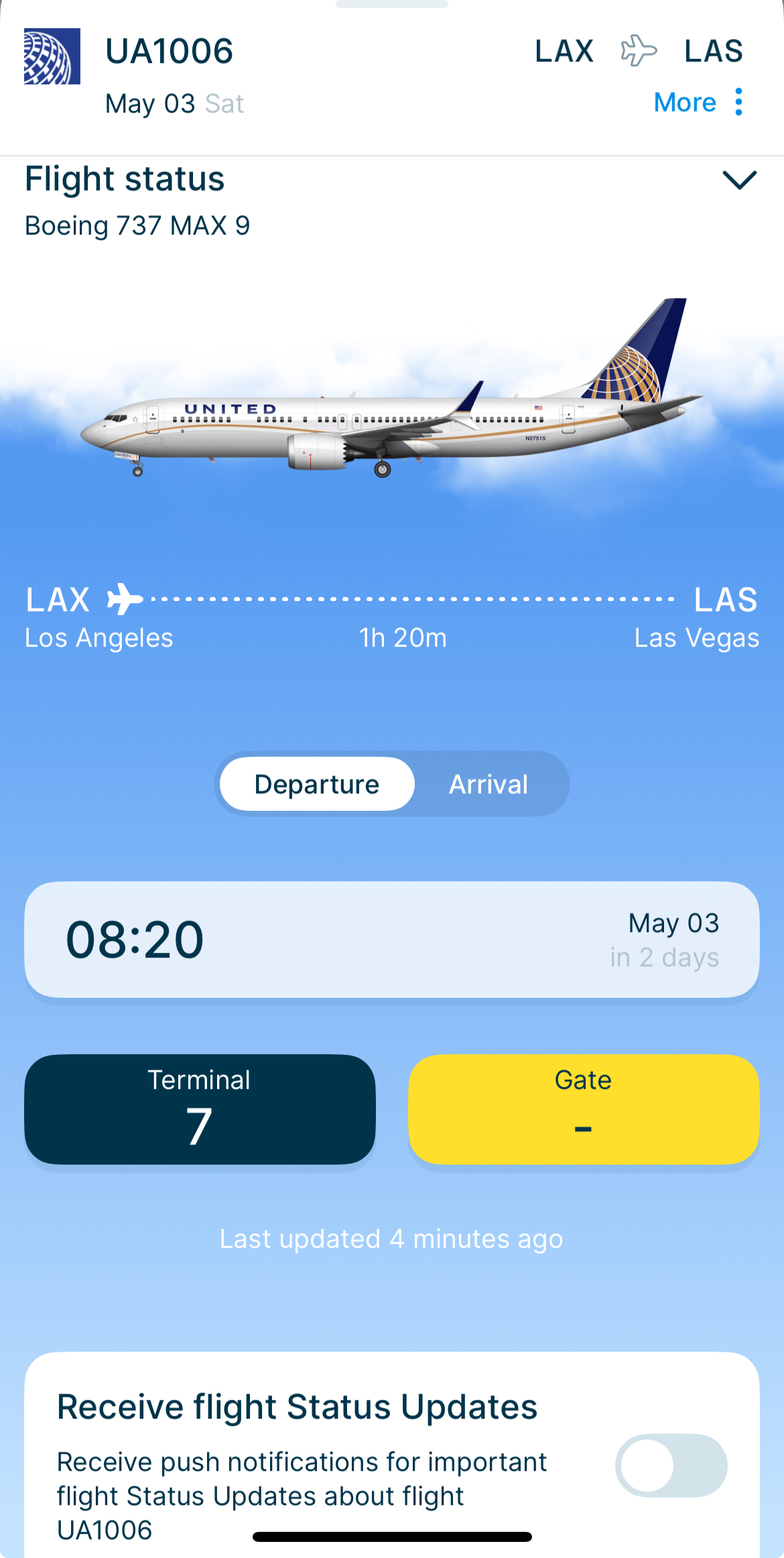
In the StaffTraveler app, Flight Status Updates sit underneath the loads on a flight card. Everything you need to know about your flight is then in one place.
Enable Flight Status Updates
To get live updates on your phone, turn on Flight Status Updates in the app. Here is how:
Open the flight you are interested in.
Underneath the loads on the flight card, you will find the live flight status section.
You will find a switch labeled 'Receive flight Status Updates'. Turn it on to start receiving live updates.
Benefits of Flight Status Updates
Real-time information: Get the latest updates on your flight status, so you always know where things stand.
Convenience: Notifications come straight to your phone, so you never have to go looking for news about your flight.
Improved planning: Timely alerts help you plan your travel and avoid long waits or missed connections. When a flight is canceled, the airline rebooks its passengers onto later flights, including yours. Turn on Flight Status Updates for the flights before yours, and you will see those extra passengers coming.
Tips for using Flight Status Updates
Check notification settings: Allow notifications from the StaffTraveler app on your phone, so you see every update.
Stay connected: Keep your phone online, so updates reach you the moment they happen.
Keep the app up to date: Run the latest version of the StaffTraveler app to get every new flight status improvement.